Dictation that stays on your desk.
Hold a key, speak, let go. The text lands in whatever app you were typing in. Speech recognition runs on your own CPU, so your audio never leaves the machine, and once a model is downloaded it works with the Wi‑Fi off.
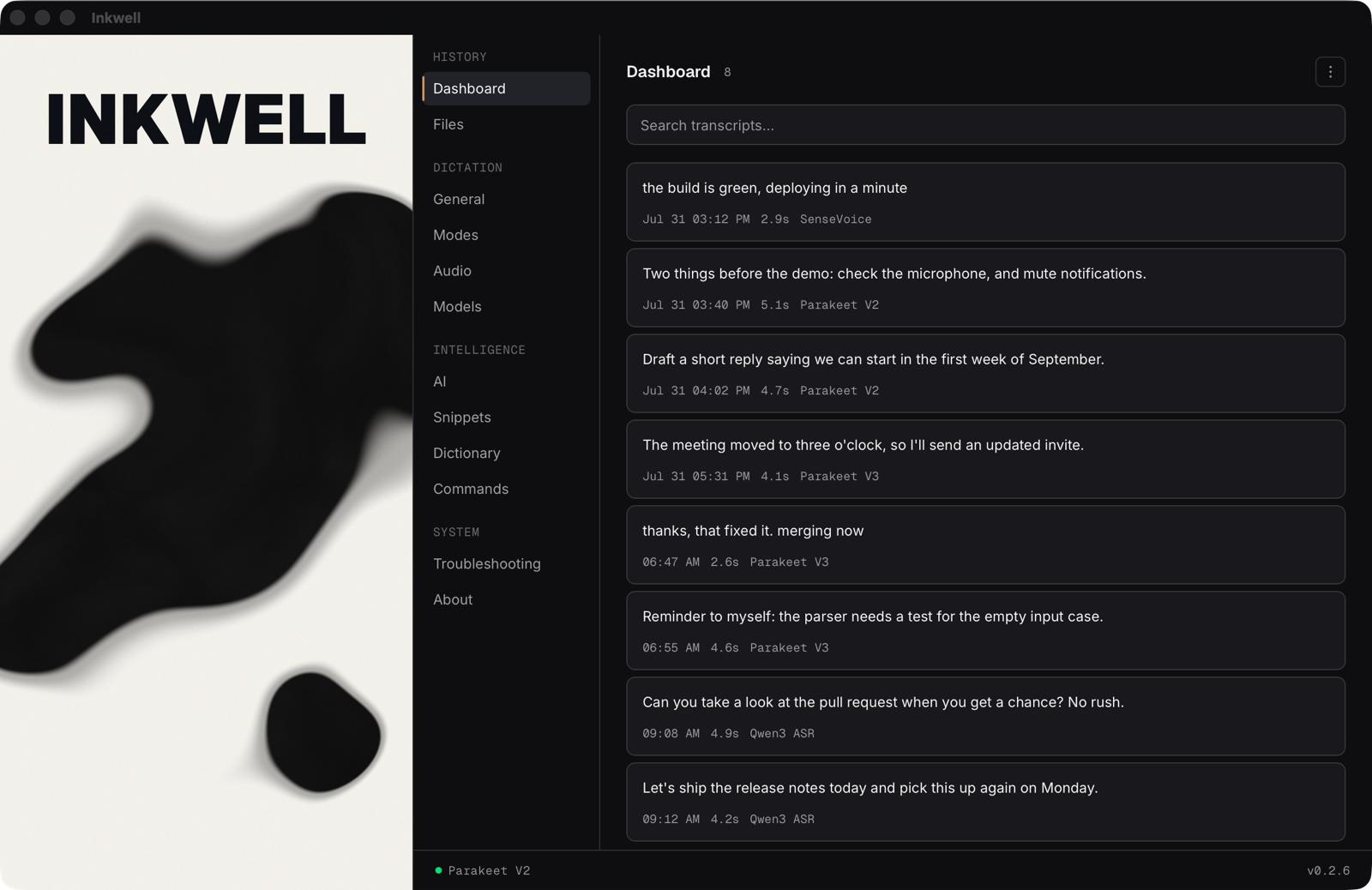
A text field, in whatever app you were typing in
Can you take a look at the pull request when you get a chance? No rush.
Hold the key, or focus it and hold Space.
- macOS disk image for Apple Silicon, 19.8 MB Apple Silicon, 19.8 MB, or Intel Mac disk image, 21.8 MB, 21.8 MB. Both signed with a Developer ID and notarised by Apple, so they open normally.
- Windows installer, 11.3 MB Installer, 11.3 MB. Not code signed yet, so SmartScreen warns: click “More info”, then “Run anyway”.
- Linux AppImage, 99.1 MB AppImage, 99.1 MB, or the .deb. Best effort, not regularly tested.
It connects to four places and no others: Hugging Face, for a speech model the first time you pick it; GitHub, for the small voice-detection model if it is missing; the project’s own update worker, five seconds after launch; and, only when you use AI polish or voice editing with a key you added, that key’s provider, which gets your text and never the audio. What each call carries.
What else it does.
Everything here runs on your machine, apart from the two features that need your own API key. A fresh install shows four tabs; the rest appear when you switch on Advanced Mode in General settings, so the first run stays a hotkey and nothing else.
Dictation
- Anywhere you type
- A global hotkey, push to talk by default or toggle. Transcription starts when you let go, the text is pasted into the focused app, and the text that was on your clipboard is put back. (An image on the clipboard can’t be restored; it stays replaced.)
- Tray and overlay
- It lives in the tray, and the hotkey works with the window hidden. A small always-on-top overlay shows when it is recording.
- Live preview
- Optional, off by default. The words appear on the overlay while you are still speaking. They come from a second, faster model, so they are lowercase and unpunctuated; what gets pasted is made the usual way. It costs a 73 MB English download.
- Speech cleanup
- “Um”, “uh” and immediate stutters are removed before the paste, without changing what the sentence says.
- Voice commands
- A wake word plus an action: “inkwell, scratch that”, “inkwell, formal mode”. Off until you switch them on.
How it writes
- Modes
- A mode bundles a writing style, speech cleanup and AI polish, and switches itself on by the app you are typing into: formal and polished in email, lowercase and unpunctuated in a terminal, without touching a setting. The first mode whose app list matches wins; otherwise the default applies. On macOS and Windows.
- Style
- Formal, Casual or Relaxed. Sets capitalisation and punctuation without touching a model.
- Dictionary
- Fix the words your model keeps getting wrong. Case insensitive, matched on word boundaries.
- Snippets
- Trigger phrases expand to full text, with
{date},{time}and{clipboard}filled in.
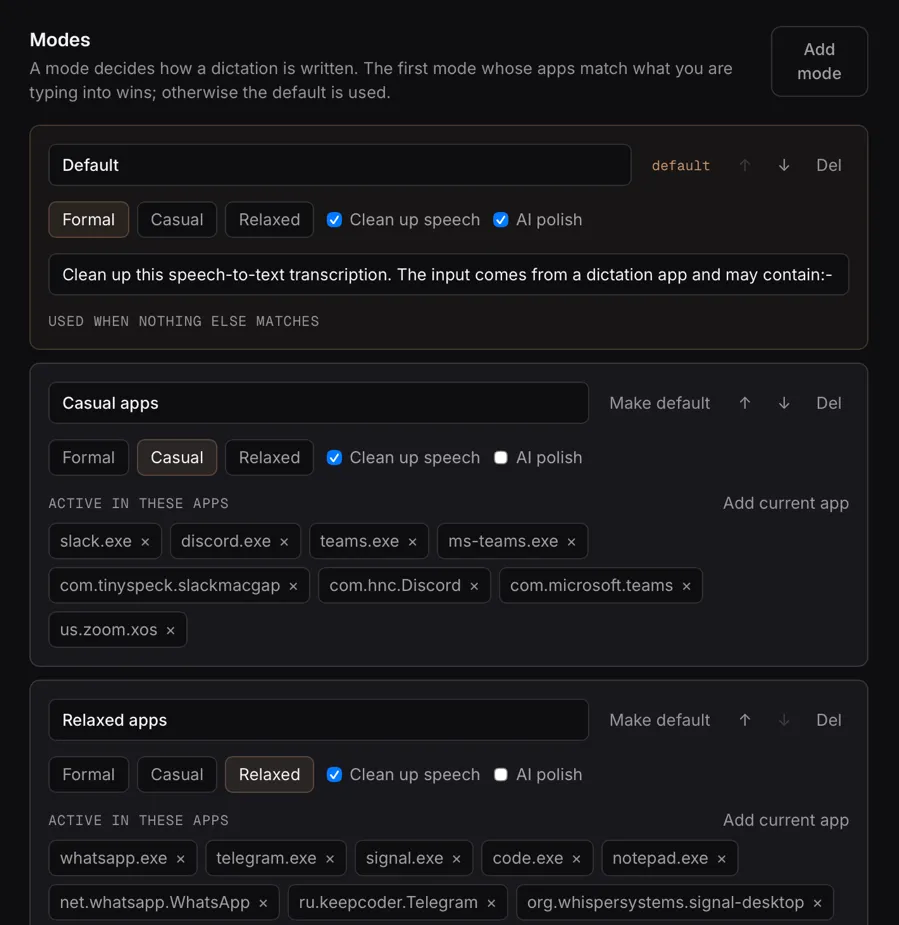
slack.exe) and by bundle
identifier on macOS (com.tinyspeck.slackmacgap).
What it keeps
- History
- Every transcript, in a SQLite file on your machine: searchable, editable, and exported as TXT, SRT, JSON or CSV. Nothing syncs.
- Files
- Drag in audio or video (MP3, WAV, FLAC, OGG, M4A, MP4, MKV and more) and it is transcribed by the same local model.
- Stats
- Words dictated, speaking time, streak, daily activity and model usage, computed from the history you can see and delete, not from a hidden counter.
With your own key
Two features rewrite text, which is a language model’s job, so they need an API key. Dictation itself never does, and never leaves your machine.
- Voice editing
- Select text anywhere, hold the edit hotkey (Cmd+Shift+E on macOS, Ctrl+Shift+E elsewhere), say what to change, and the rewrite replaces the selection: “make this shorter”, “fix the grammar”, “turn this into bullet points”. Clear the hotkey in General to turn it off.
- AI polish
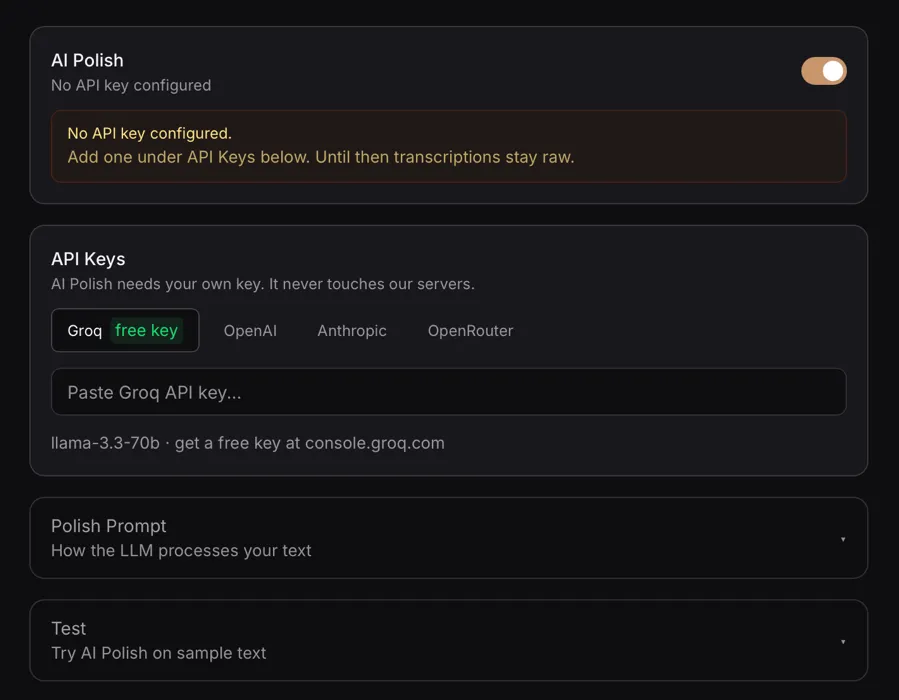
- Optional, off by default. Cleans up grammar and false starts. Your text, never the audio, goes from your machine to OpenAI, Groq, Anthropic, OpenRouter or an OpenAI-compatible endpoint you run yourself. The key stays in the OS keyring.
- A free key
- Groq’s free tier covers ordinary personal use and needs no credit card. Sign in at console.groq.com, create a key under API Keys and copy it (Groq shows it once), then paste it into Inkwell’s AI tab. About two minutes.
What it does not do
- Speaker labels, meeting mode or calendar integration. Not planned.
- GPU acceleration. Everything runs on the CPU.
- Per-app modes on Linux, where the foreground app can’t be read.
- A voice agent mode. It was removed in the rehaul; it targeted a gateway that no longer exists.
- Silence trimming before its model arrives. The voice-detection model downloads on first run; until it has, dictation works, silence isn’t trimmed, and the app says so.
Five models, measured rather than quoted.
All five run on your CPU through sherpa-onnx. None ships inside the installer: each downloads from Hugging Face the first time you pick it, and after that it needs no internet. Parakeet V3 is the default.
| Model | Word error ratelower is better | Time for 57 s of audio | Download | Languages | Pick it when |
|---|---|---|---|---|---|
| Qwen3 ASR Alibaba | 5.6% word error rate | 9.2 s for 57 s of audio | 940 MB download | Languages: 30, including Nordic | You want the best accuracy, or you move between English and a Nordic language. The only one here that doesn’t make you choose. |
| Parakeet V2 NVIDIA | 8.0% word error rate | 3.6 s for 57 s of audio | 670 MB download | Languages: English | You only dictate in English. Same download as V3, and measurably more accurate. |
| SenseVoice Alibaba | 9.3% word error rate | 1.7 s for 57 s of audio | 240 MB download | Languages: en, zh, ja, ko, yue | Small disk, slow connection or an older machine. A quarter of the size, the fastest here, and as accurate as Whisper. |
| Whisper Turbo OpenAI | 9.3% word error rate | 19.8 s for 57 s of audio | 800 MB download | Languages: 99 | You need a language the others don’t reach. Nothing else recommends it. |
| Parakeet V3 NVIDIA | 10.5% word error rate | 3.7 s for 57 s of audio | 670 MB download | Languages: 25 European | The default. You switch between European languages, or want the language detected for you. |
Word error rates are measured on eight recordings of one voice, scored against what was actually said, with the tool in the repository. Eight clips is directional, not a benchmark, and your voice is not that voice: measure your own with Save Debug Audio and the same tool. The times are for those same 57 seconds of audio, on a Mac’s CPU. The list is short on purpose. It was thirteen models, most of which lost on every axis at once.
What it sends, all of it.
No account, no telemetry, no analytics, no crash reporting, and no server of this project’s that your text passes through. Here is what stays, and every call that goes out.
Stays on this machine
- Your voice
- Captured, resampled and transcribed in memory by a model on your CPU. Never uploaded, and never written to disk unless you switch on Save Debug Audio, a troubleshooting setting that is off by default.
- Your transcripts
- A SQLite file in the app’s data directory. Nothing syncs.
- Your settings
- Modes, snippets, dictionary and voice commands, as plain files on your disk.
- Your API key
- If you add one, it lives in the OS keyring (the macOS Keychain, the Windows Credential Manager or the Secret Service on Linux), never in a config file in plain text. A key an older build did write in plain text is stripped the next time settings load.
Every network call
| Call | Goes to | When | What it carries |
|---|---|---|---|
| Speech model download | Goes toHugging Face | WhenThe first time you pick a model | What it carriesA request for the model’s files |
| Voice-detection model download | Goes toGitHub, the sherpa-onnx releases | WhenOn first run, if the Silero VAD model is missing | What it carriesA request for that one file |
| Update check | Goes toThe project’s own worker, inkwell-updater. | WhenFive seconds after every launch. There is no switch for it yet | What it carriesThe app version, OS target and CPU architecture. The worker only reads the latest release record |
| AI polish and voice editing | Goes toThe provider whose key you added: OpenAI, Groq, Anthropic, OpenRouter or your own endpoint | WhenOnly while polish is on, or when you use voice editing | What it carriesYour text, never the audio, sent straight from your machine |
Without polish or voice editing, and with your models on disk, the update check is the only call left: dictation works with the network unplugged. Earlier builds had a free proxy tier that routed polish through a server the maintainer paid for. It is gone; your own key is the only path.
Download Inkwell 0.2.9.
Free, with no account and no email address asked for. Every build is also on the GitHub releases page, and you can build it from source.
macOS
This computer
Apple Silicon, the primary platform, and Intel.
- Inkwell_0.2.9_aarch64.dmg 19.8 MB, Apple Silicon
- Inkwell_0.2.9_x64.dmg 21.8 MB, Intel
- Open the disk image, drag Inkwell to Applications and open it. It is signed with a Developer ID and notarised by Apple, so there is no warning to click past.
- Allow Microphone access when asked.
- Allow Accessibility access in System Settings, under Privacy & Security. Inkwell pastes with a synthetic keystroke, which macOS blocks until you grant this. It is the one people miss: without it, dictation transcribes and nothing appears.
Secure Input blocks the paste, so dictating into password fields and some terminals does nothing.
Windows
This computer
Windows 10 and 11. The secondary platform, built by CI on every release.
- Inkwell_0.2.9_x64-setup.exe 11.3 MB, recommended
- Inkwell_0.2.9_x64_en-US.msi 15.9 MB
Run the installer. It is not code signed yet, so SmartScreen says “Windows protected your PC”: click “More info”, then “Run anyway”. Your browser may also flag the download as uncommon.
Only macOS is signed today. The source and the workflow that built these files are public, so you can check what you are running.
Linux
This computer
A recent desktop on x86-64. Best effort: built by CI, not regularly tested.
- Inkwell_0.2.9_amd64.AppImage 99.1 MB
- Inkwell_0.2.9_amd64.deb 23.8 MB
- Expect rough edges. Bug reports that name your distribution and desktop are welcome.
- The global hotkey and the paste keystroke go through X11, so a Wayland session is untested.
- Per-app modes stay off, because the foreground app can’t be read.
First run
- Finish the short onboarding: pick a microphone, download a model, test the hotkey. The installer holds no speech models; Parakeet V3 (670 MB) is the default.
- The record hotkey starts as Cmd+Shift+Space on macOS and Ctrl+Space elsewhere. Change it in Settings, under General; on macOS, pick one that doesn’t collide with Spotlight or input-source switching.
- Hold the hotkey, speak, let go. The text is pasted where your cursor is.
Requirements
- System
- macOS on Apple Silicon or Intel, Windows 10 or 11, or a recent Linux desktop
- Memory
- 2 GB free with Parakeet V3, less with the small models
- Disk
- About 50 MB for the app, plus 240 to 940 MB for the model you choose
- Microphone
- Any
What it costs: nothing.
No paid tier, no licence keys, no account, and no feature behind a paywall, now or later. If Inkwell saves you time, you can leave a tip. €10 is the suggested amount, it is entirely voluntary, and nothing in the app is gated behind it.
Help that is worth more: report what breaks on your hardware, send a pull request, or star the repository.
Code signing policy
Free code signing provided by SignPath.io, certificate by SignPath Foundation.
Only artifacts built by this repository’s GitHub Actions workflows from this repository’s own source are signed. Each release signing request is approved by hand.
Privacy policy: see Privacy. This program does not send your audio anywhere. It contacts networked systems only to check for updates, to download the speech and voice-detection models it runs on, and, when you use AI polish or voice editing with your own API key, to send text to the provider you selected.
Status: Windows builds up to v0.2.9 are not signed yet.